Putting a phone or PC interface in front of a microcontroller (micro) usually means picking a
remote-control tool — and they take very different approaches: cloud dashboards, drag-and-drop
GUI builders, self-hosted automation hubs, or protocols where the device itself defines the UI.
pfodWeb belongs to that last category: a browser-based client where the
microcontroller emits the entire UI at runtime, no dashboard to build,
and no cloud account. pfodWeb is not limited to Arduino: the plain C++
pfodParserCPP library lets any micro with a Serial,
BLE or TCP/IP / HTTP connection serve the same UI using its vendor's native SDK (STM32Cube, ESP-IDF, Pico SDK, Zephyr, MPLAB Harmony, MCUXpresso, etc.).
pfodWeb is also built for AI: an AI guide plus in-page browser hooks let an AI agent design the GUI, generate the code and run and check the result in pfodWeb by itself. Other tools' AI assistants generate a dashboard or code for you to check; with pfodWeb the AI agent drives and tests pfodWeb itself — it loads the design, generates the code, replays the device's messages and captures the displayed screen to verify the GUI looks and works as intended, then iterates until it does.
This document surveys the main alternatives, groups them by how they work, compares them feature-by-feature against pfodWeb, and ends with a decision guide for choosing the right tool for a given project.
Stream:
read(), write(), available(), flush()), so the same parser and generated UI code
work over Serial, BLE or TCP/IP / HTTP — just define the appropriate Stream for your connection using your SDK's driver.
Ready-to-build pfodParserCPP examples are provided for STM32 (STM32Cube HAL), ESP32 (ESP-IDF), ESP8266 (ESP8266_RTOS_SDK),
Nordic nRF52 (nRF5 SDK) and nRF54L (nRF Connect SDK Bare Metal), Zephyr RTOS, Raspberry Pi RP2040 / RP2350 (Pico SDK),
Microchip SAM and PIC32 (MPLAB Harmony 3) and NXP Kinetis and MCX (MCUXpresso SDK).
| Tool | Transport | UI built where | Cloud needed |
|---|---|---|---|
| pfodApp (native Android) | BT, BLE, WiFi/TCP, SMS | On the device, at runtime | No |
| pfodWeb (browser) | HTTP; Serial, BT Classic (SPP serial) and BLE natively, or via pfodProxy if the browser lacks support; TCP/IP via pfodProxy | On the device, at runtime | No |
Both these are supported by the pfodWeb designer
that lets you build the menu / display and specify the board pins to control and then generate the code for the micro — complete Arduino sketches for Serial, BLE, WiFi (TCP/IP) and HTTP connections.
The pfodWeb designer's pfodParserCPP target generates the menus, drawings, main.cpp and
Stream / clock templates for non-Arduino micros; you complete the board-specific parts (e.g. the Stream for your Serial, BLE or TCP/IP connection) with your SDK.
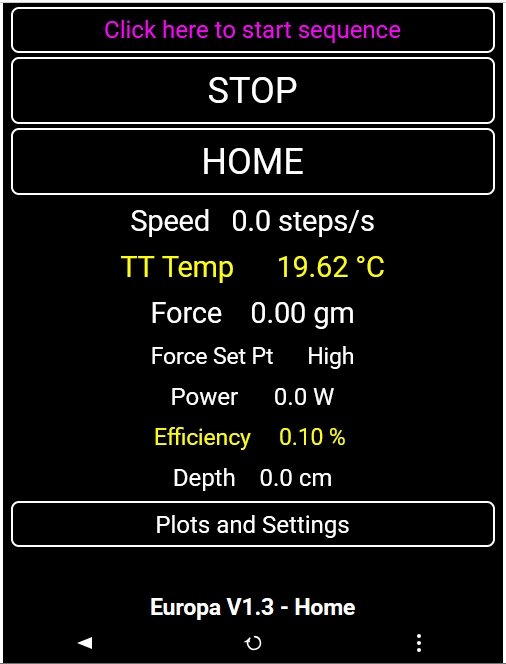
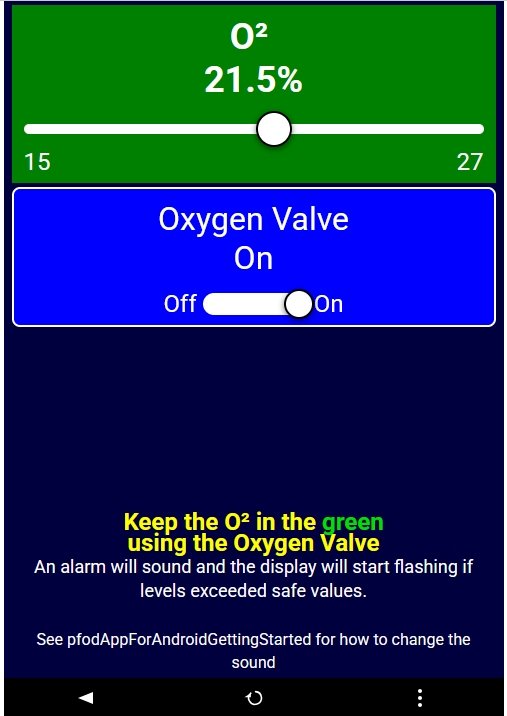
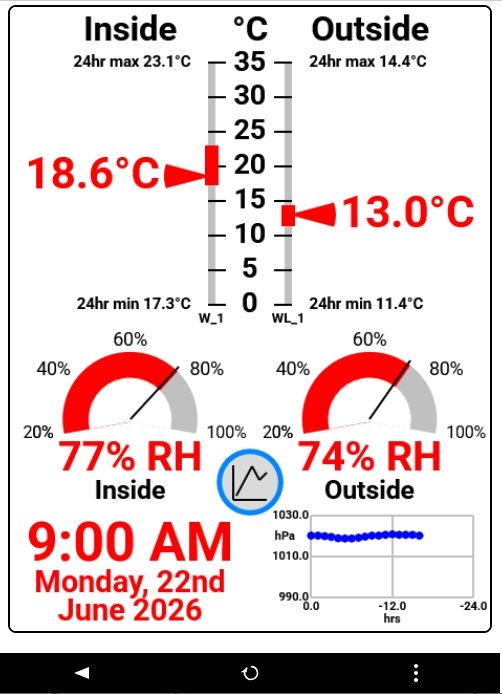
Below are some example pfodWeb screens:-
Europa Ice Sampling Prototype
, an example slider display and on/off button, from the demoScreen sketch, and a home
Weather Station, a more advanced drawing menu item.
| Capability | pfodWeb | Blynk IoT | RemoteXY | Virtuino | Arduino Cloud | Bluetooth Electronics | ESPHome (+ Home Assistant) | Node-RED (Dashboard) | ArduinoStudio | LVGL | Electric UI |
|---|---|---|---|---|---|---|---|---|---|---|---|
| No app install (runs in browser) | yes — for any browser since 2017 | no — app/web cloud | no — app | no — app | partial — web + app | no — Android only | partial — browser via HA server | yes — browser dashboard (server required) | partial — browser (Web Serial in Chrome/Edge/Opera); desktop Bridge app needed for Firefox/Safari and some blocks | partial — LVGLRemoteServer and Emscripten builds can run in a browser; wired display is primary mode | no — Electron desktop app (Win/Mac/Linux); not browser-based |
| Needs Dashboard/App to code | partial — designer is convenient, but can edit the device code directly | yes — build dashboard | yes — build + regen code | yes — build panels | yes — build things/vars | yes — build panel | partial — YAML config, dashboards built | yes — build flows + dashboard | yes — build logic + UI (no-code) | yes — C/C++ code or SquareLine Studio; remote paths require additional DIY server code | yes — build the UI yourself in React/JS |
| Change UI = just edit the device code | yes — instant | no — edit dashboard too | no — regenerate | no — re-edit panel | no — edit variables | no — re-edit panel | partial — edit YAML, entities auto-add | no — UI separate from firmware | no — board runs stock Firmata; logic+UI built in app | yes — recompile firmware | no — UI is a separate React app, edited independently of the firmware |
| Works fully offline / no account | yes | no — cloud login | partial — local modes | yes — local modes | no | yes | yes | yes | partial — simulator/demo needs no account; saving projects needs sign-in to the hosted app | yes — fully local (wired display or LAN via LVGLRemoteServer) | yes — core framework runs fully local/offline; optional paid Cloud tier needs an account |
| No third-party server (privacy/longevity) | yes | no | partial | yes — local | no | yes | partial — needs self-hosted HA server | partial — needs self-hosted Node-RED server | no — hosted web app; ESP32 Wi-Fi control goes via an internet relay | yes — no cloud; remote paths are DIY/self-hosted | yes — local app; optional paid Cloud tier for remote access |
| Multiple transports, one client | yes — HTTP/Serial/BLE/BT/TCP | partial — WiFi/BLE via cloud | yes — BT/BLE/WiFi/cloud | yes — BT/WiFi/MQTT | partial — WiFi/cellular/LoRa | no — BT/BLE only | partial — WiFi/API, BLE proxy | yes — serial/MQTT/TCP/HTTP via nodes | partial — USB (Web Serial or Bridge app); ESP32 Wi-Fi via internet relay | partial — wired display primary; Wi-Fi via LVGLRemoteServer (UDP) or custom WebSocket/VNC (DIY) | yes — Serial/USB and BLE from one app |
| Non-Arduino micros (vendor SDK / RTOS, no Arduino framework) | yes — pfodParserCPP plain C++ library; any micro via Serial, BLE, or TCP/IP / HTTP, by implementing the pfodParser's 'Stream' interface | partial — Arduino-framework library; other devices via HTTP/MQTT API | partial — primarily Arduino-framework library | partial — MQTT version works with any MQTT-capable device | partial — Arduino/ESP boards; other devices as "manual devices" via Python/MicroPython/JS SDKs | yes — simple text protocol over any BT/BLE serial link | no — ESPHome firmware only on its supported chips; others via MQTT/HA integrations | yes — any device that talks serial/MQTT/TCP/HTTP | no — Arduino boards (Uno/Nano/Mega/Leonardo/Micro/Uno R4) and ESP32 running Firmata | yes — plain C, ported to many MCUs/RTOSes | yes — plain C embedded library |
| Regenerate the UI without losing logic code (MVC separation) | yes — generated view classes are sub-classed by your logic/controller code; re-generate the view and your code is untouched | n/a — no code generated; dashboard kept in sync by hand | partial — regenerated GUI config block replaces the old one; your logic must be kept separate by hand | n/a — no code generated; panels kept in sync by hand | partial — regenerated thing properties file; your code in the sketch is kept | n/a — no code generated; panel kept in sync by hand | n/a — YAML config, no generated user code | n/a — flows and dashboard are separate from firmware | n/a — logic and UI both live in the hosted app | partial — SquareLine Studio regenerates UI files; event code kept in separate files | n/a — UI is hand-written React |
| Design saved as a local file (reload later to edit) | yes — menu/drawing design exported as JSON with the generated code; reload into the designer to edit and regenerate | no — templates stay in the Blynk cloud; clone within the same account only (template export/import reportedly Business plan only) | no — projects stored in the online editor; no project-file export documented | yes — Project Manager "Export Project" to a file, imported on other devices | yes — dashboard template export as JSON/YAML via Arduino Cloud CLI; custom templates download as .tino | yes — panel Import/Export to a .kwl file | yes — YAML config file | yes — flows export/import as JSON | partial — projects saved to the hosted account; only the generated .ino code can be downloaded | yes — SquareLine Studio project file, or UI source code | yes — UI is source code |
| AI-ready (AI agent can design, generate and drive and test the GUI itself) | yes — AI guide plus in-page hooks (file loading, message replay, screen capture): the AI agent drives and tests pfodWeb in a browser itself, verifying the GUI without a human in the loop | partial — built-in AI Assistant builds dashboards, datastreams and code from a text prompt; MCP server for AI coding tools (templates/devices only, dashboard layout stays in the console) | no — no AI features found; GUI built in visual editor | no — no AI features found; panels built in app | partial — Claude-powered AI Assistant in the Cloud Editor writes/fixes sketch code; dashboards built in web editor; community MCP server only | no — no AI features found; panels built in app | partial — ESPHome Device Builder reportedly serves an MCP endpoint (2026.10) to edit YAML, compile and install; HA dashboards are separate | partial — community MCP servers and an AI-assistant node let AI read, edit and deploy flows; not in core Node-RED | partial — built-in AI Builder plans the logic and control panel from a text description; no hooks for an external AI agent | partial — official LVGL MCP server answers docs questions (read-only); LVGL Pro AI workflow and community MCP servers generate and render UIs | partial — UI is React code, AI-editable; no AI features found |
| Served from the device itself (flash-embedded) | yes — pfodWeb.html client can be served from micro | no | no | no | no | no | partial — optional basic built-in web UI | no | no | yes — runs directly on MCU; LVGLRemoteServer also runs on the MCU | no — separate desktop app, not served from the device |
| Hierarchical menus | yes | partial — tabs | partial — pages | partial | partial | no | partial — HA views/tabs | partial — dashboard tabs/groups | no — sequence canvas + panel | yes | yes — build any structure you like in React |
| Interactive touch GUIs | yes | no | no | partial — basic | no | no | no | partial — via template/SVG nodes | no | yes — touchscreen on wired display; remote touch via LVGLRemoteServer or custom WebSocket | yes — full React/Electron UI toolkit |
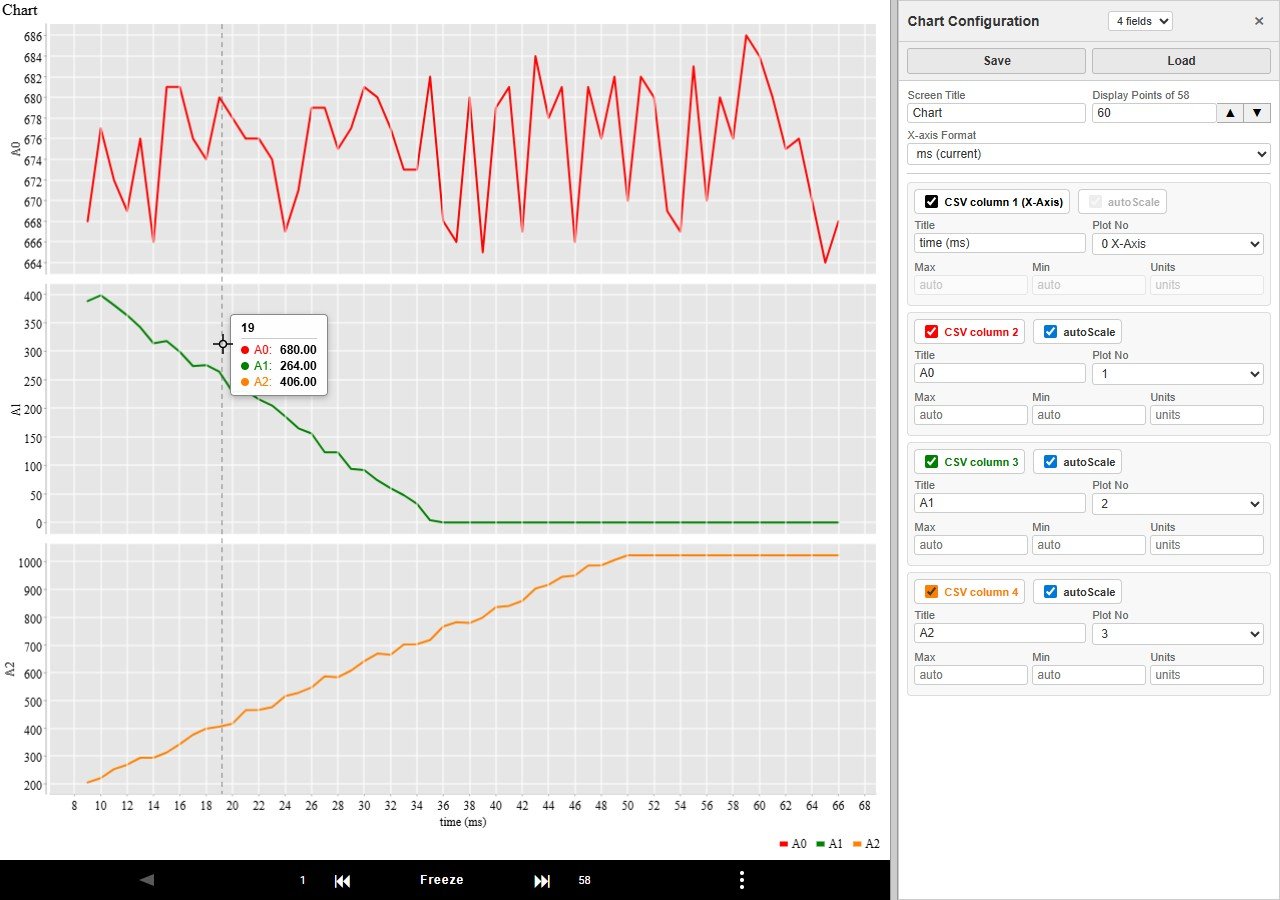
| Real-time charts + CSV logging/download | yes — freeze/scroll/scale, group/separate, CSV export+reload | partial — cloud SuperChart; free ~1 msg/min, CSV export PLUS/PRO | partial — live graph only, app-side history, no CSV export | partial — charts; logging via separate logger | partial — cloud charts + CSV download (emailed) | partial — rolling plot only, no logging | partial — HA history graphs; CSV via HACS card/Python | partial — chart node; CSV via wired csv/file nodes | not stated | partial — lv_chart widget on-device; no CSV logging/export | partial — built-in real-time plotting; CSV export not confirmed |
| Protocol-level 128-bit auth (no shared cloud) | yes — challenge/response (i) | partial — cloud TLS | partial | partial | partial — cloud | no | yes — encrypted native API | partial — server TLS/auth | not stated — account login only; no device-link authentication stated | no — remote paths (UDP/WebSocket/VNC) are unauthenticated by default; DIY to add | not stated |
| Cost | Free | Freemium/paid | Freemium/paid | Free/paid | Freemium/paid | Free | Free | Free | Free tier (5 projects, control panel included); Hobby $4/mo, Pro $7/mo | Free (MIT); SquareLine Studio free community / paid plans; LVGLRemoteServer free open-source | Free (open-source core); Cloud/enterprise tiers paid |
| Direct Device access from anywhere | yes — for HTTP micro self-hosted | yes | partial — via cloud | partial — MQTT | yes | no | partial — paid Nabu Casa or DIY | no — DIY | partial — ESP32 over Wi-Fi via internet relay (app tab must stay open); shareable project links | no — LAN only | partial — paid Cloud tier for remote/fleet access |
| Rules/automation/push notifications | no | yes | partial | partial | yes | no | yes — HA automations | yes — core feature | partial — visual Check/Loop/Wait logic; no push notifications stated | partial — device-side code only | no — UI framework only, no built-in automation engine |
| Polished themeable drag and drop widgets | no — relies on code library of interactive GUI elements | yes | yes | yes | yes | yes | yes — HA Lovelace | yes — Dashboard 2.0 | yes — drag-and-drop control panel (free tier) | yes — animated widgets, themes, styles | partial — themeable React component library, code-based not drag-and-drop |
(i) Note pfodApp implements 128bit auth, pfodWeb implementation to come.
| Tool | Minimum board | Notes |
|---|---|---|
| pfodWeb | Uno or higher, or any non-Arduino micro with Serial, BLE or TCP/IP / HTTP | USB/Serial: tiny pfod parser runs on almost any board; WiFi (TCP/IP or HTTP) and BLE can be used where the board supports them. Non-Arduino micros use the plain C++ pfodParserCPP library with the vendor's SDK; the connection is a Stream you define for Serial, BLE or TCP/IP / HTTP — examples for STM32, ESP32/ESP8266 (SDK), nRF52/nRF54L, Zephyr, RP2040/RP2350 (Pico SDK), Microchip SAM/PIC32 and NXP Kinetis/MCX |
| pfodWeb (via pfodParserC) | ATtiny84 / PIC16 / PIC18 class | Plain C, for very small micros with no C++ compiler or little memory (e.g. PIC16/PIC18 with XC8, AVR without Arduino). Menus only (no drawings), Serial connection. No library to install — the pfodWeb designer's "Minimal C code no Dwgs" target generates the parser and menu code; you complete the serial-port template. The ATtiny84 example needs 2340 bytes flash and 128 bytes RAM (plus stack) |
| Blynk IoT | ESP8266 / ESP32 | Needs an IP stack; Uno requires add-on IP capable shield |
| RemoteXY | Uno or higher | USB/serial on a bare Uno; BT needs an add-on module (e.g. HC-05); ESP for WiFi |
| Virtuino | Uno or higher | USB/serial on a bare Uno; BT needs an add-on module (e.g. HC-05); ESP for WiFi/MQTT |
| Arduino Cloud | ESP32 / MKR / Nano 33 IoT / Uno R4 | No classic Uno R3 |
| Bluetooth Electronics | Uno or higher | Requires a BT/BLE module (e.g. HC-05) |
| ESPHome (+ Home Assistant) | ESP8266 / ESP32 | No AVR support |
| Node-RED (Dashboard) | Uno or higher | Device just talks serial/MQTT; logic runs on the Node-RED host |
| ArduinoStudio | Uno or higher | Board runs stock StandardFirmata; ArduinoStudio drives it from the browser over USB serial (Web Serial) or the desktop Bridge app. Uno/Nano/Mega/Leonardo/Micro/Uno R4; ESP32 also over Wi-Fi via an internet relay; a generated .ino can be downloaded to run standalone |
| LVGL | ESP32 / STM32 / RP2040 / NXP i.MX RT | Minimum ~16 KB RAM, 64 KB flash (practical floor is ESP32-class); wired display primary — requires TFT/OLED/e-paper + optional touchscreen. Remote paths (LVGLRemoteServer, custom WebSocket/VNC) need Wi-Fi so ESP32-class or similar. |
| Electric UI | Any board with USB-Serial or BLE | Firmware side just needs the Electric UI Arduino/C library and a Serial or BLE link; no specific board tier required, since the UI runs on the desktop, not the device |
| Tool | Real-time chart | Freeze / scroll / zoom | Group & separate plots | CSV log / export | Local (no cloud/server) |
|---|---|---|---|---|---|
| pfodWeb | yes — live CSV stream | yes — freeze, X-scroll, halve/double pts, Y min/max | yes — any number, grouped or on separate axes | yes — export & reload any CSV | yes — runs in the browser, no cloud/server |
| Blynk IoT | yes — SuperChart | partial — pan historical ranges | yes — multi-datastream | partial — CSV export needs PLUS/PRO (paid) | no — Blynk Cloud (free ~1 msg/min) |
| RemoteXY | yes — Online Graph (while connected) | no | partial — multiple vars per graph | no — no built-in export | partial — local link but phone-side history only |
| Virtuino | yes — chart/graph element | partial — limited | partial | partial — via separate Virtuino logger | yes — local modes |
| Arduino Cloud | yes — dashboard chart | yes — selectable time range | yes — multi-variable | yes — CSV download (emailed) | no — cloud account / online |
| Cayenne (myDevices) | yes — line-graph widgets | partial — timeframe / custom-range filter | yes — multi-widget dashboard | yes — CSV download (time-range) | no — myDevices cloud / account |
| Thinger.io | yes — time-series widgets | partial — historical / aggregated ranges | yes — multi-widget dashboard | yes — bucket export CSV/JSON/ARFF | yes — self-hosted (open-source) or cloud |
| Bluetooth Electronics | yes — rolling plot | no — fixed rolling window | partial — multiple graph panels | no — no logging/export | yes — local BT/BLE, no cloud |
| ESPHome (+ Home Assistant) | yes — HA history graph | partial — HA time-range zoom | partial — multi-entity cards | partial — via HACS card / Python | yes — self-hosted (no third-party cloud) |
| Node-RED (Dashboard) | yes — ui-chart node | partial — limited interaction | yes — multi-series / charts | partial — DIY csv + file nodes | yes — self-hosted server |
| ArduinoStudio | not stated | not stated | not stated | not stated | no — hosted web app (simulator needs no account) |
| LVGL | yes — lv_chart widget (line, bar, scatter) | no — fixed canvas; scroll requires custom code | partial — multiple series per chart | no — no storage or export | yes — on-device display, no cloud/server |
| Electric UI | yes — built-in real-time plotting (core feature) | not stated | not stated | not stated | yes — local desktop app; optional paid Cloud tier for remote access |
Only pfodWeb is "yes" across freeze/scroll/zoom and group/separate plots and local CSV logging — the others are cloud-bound, export-limited, or require you to wire/host the logging yourself.
pfodAI-guide.md) and
in-page hooks (loading design files without the file dialog, replaying recorded messages,
capturing the displayed screen as a PNG) so an AI agent can design the GUI, generate the code,
and run and check the result in a browser by itself. Blynk, Arduino Cloud and ArduinoStudio now
have AI assistants that generate a dashboard or code from a prompt, but you still have to check the
result; with pfodWeb the AI agent closes the loop — it sees the screen it built, finds what is wrong,
fixes the design or code and re-tests, without a human in the loop.main.cpp, plus Stream and clock templates you complete with your SDK.
The same generated code works with both pfodWeb and pfodApp.
The generator also exports the menu and drawing design as JSON files, which can be reloaded
into the designer later to edit the design and regenerate the code.Choose pfodWeb when you want a no-install, no-account, locally-controlled,
instantly-updatable UI that the device itself defines, on Arduino or non-Arduino micros — ideal for direct local control,
privacy-sensitive or air-gapped setups, and avoiding cloud-vendor lock-in/shutdown.
Choose a cloud
platform (Blynk / Arduino Cloud / Cayenne) when remote-from-anywhere access,
automation rules, push alerts, and managed fleets matter more than locality and self-sufficiency.
RemoteXY/Virtuino/Bluetooth Electronics sit in between — local-capable but you
still hand-build and maintain the GUI separately from the firmware.
Electric UI sits at the developer end of that same spectrum — no drag-and-drop,
no device-defined UI; you code a custom desktop app (React) and the firmware-side comms yourself,
in exchange for full control and built-in real-time plotting.
| Your priority / scenario | Best fit | Why |
|---|---|---|
| Uno, Mega, or other low-memory boards | pfodWeb / pfodApp / RemoteXY / Virtuino | pfodWeb also runs menus on ATtiny84 / PIC16 / PIC18 class micros via pfodParserC; pfodWeb/pfodApp and RemoteXY/Virtuino run on bare AVR over USB-serial or BT module; cloud platforms (Blynk IoT, Arduino Cloud, ESPHome) and LVGL all require ESP32-class hardware |
| Non-Arduino micro using its vendor SDK or RTOS (STM32Cube, ESP-IDF, Pico SDK, Zephyr, MPLAB Harmony, MCUXpresso…), want a phone/browser UI without writing one | pfodWeb / pfodApp (via pfodParserCPP) | Plain C++ library, no Arduino framework; device defines the UI over Serial, BLE or TCP/IP / HTTP via a Stream you define; designer generates the pfodParserCPP code. (Electric UI and LVGL also run on non-Arduino micros, but you code the UI yourself) |
| Have an AI agent design, generate and drive and test the GUI itself | pfodWeb | AI guide plus in-page hooks so the AI agent drives pfodWeb in a browser: load designs, generate code, replay messages and capture the screen to verify and iterate. Other tools' AI assistants (Blynk, Arduino Cloud, ArduinoStudio) generate, but leave testing to you |
| Keep revising the UI design without losing your hand-written logic | pfodWeb | Generated view classes are sub-classed by your logic/controller code; re-generating only overwrites the view files |
| Wide OS / Browser support for All transports, Serial, BLE, TCP/IP, HTTP | pfodWeb | Windows, MacOS (Intel/Apple), Linux OS's and
Chrome/Chromium, FireFox, Safari, Edge browsers from 2017 onwards Android 8+ (2017) for pfodApp |
| No app to install, no separate UI to keep in sync, change the device code and the UI just updates | pfodWeb | Device emits the UI live; runs in any browser |
| Air-gapped / private / no cloud / no account, fully local control | pfodWeb | Local request/response, no third-party server |
| UI must be served by the device itself with nothing else installed | pfodWeb | pfodWeb.html served from micro's firmware |
| One client across HTTP, USB-serial, BLE, BT and TCP | pfodWeb | Single browser page on all browsers since 2017, all transports |
| Real-time charting with interactive freeze / scroll / zoom, grouped or separate plots, and local CSV logging — no cloud | pfodWeb | Built-in charting: freeze + zoom + group/separate, export & reload CSV locally; the others are cloud-bound, export-limited or DIY-wired |
| Polished native phone dashboard, control from anywhere over the internet, zero networking setup | Blynk IoT / Arduino Cloud | Managed cloud, remote access, push alerts out of the box |
| Cloud rules engine, alerting, multi-device fleet management | Blynk / Arduino Cloud / Cayenne | Built-in automation, notifications, provisioning |
| Hand-built local panel, no cloud, willing to maintain a separate GUI | RemoteXY / Virtuino / Bluetooth Electronics | Local BT/BLE/WiFi panels, free/cheap, simple widgets |
| Already on ESP32/ESP8266 + Home Assistant, want automations and a themed dashboard, local-first | ESPHome + Home Assistant | Encrypted local API, HA automations & Lovelace UI (self-hosted server) |
| Heavy data wrangling, protocol bridging, custom logic between device and UI | Node-RED (Dashboard) | Flow-based glue, many transports, charts/CSV, scriptable automation |
| Maximum UI polish/customisation and you don't mind building it | Blynk / ESPHome+HA / Node-RED / LVGL | Themeable widget galleries and rich animated widgets (at the cost of build + maintain effort); LVGL gives the most polished on-device |
| Browser no-code: build the control LOGIC and a custom panel, share it as a link | ArduinoStudio | Firmata host-driven visual builder (board is a stock-Firmata I/O slave); you build/own the logic+UI in a hosted account (free tier, 5 projects; Hobby $4/mo, Pro $7/mo) — the inverse of pfodWeb's free, local, device-defined model |
| Rich on-device GUI; wired display primary, optional Wi-Fi remote view/control via LVGLRemoteServer or custom WebSocket/VNC (all DIY) | LVGL | On-device display library; rich animated widgets and touchscreen support; UI coded in C/C++ or built with SquareLine Studio; remote paths are community/DIY, not built-in |
| Willing to code a fully custom desktop control app (React/JS), want built-in real-time plotting, don't need the device to define the UI | Electric UI | Open-source dev framework, not a no-code tool; you own the UI code and the firmware-side comms; Serial/BLE in one app; optional paid Cloud tier for remote/fleet access |
Quick rule of thumb: